MFA Isn’t Enough Anymore
How attackers get past multi-factor authentication, and what small businesses should switch on next
For years, the most important security advice for small businesses fit in three letters: turn on MFA. It was good advice, and it still is. Multi-factor authentication stops the overwhelming majority of password-based attacks, and any business that has not switched it on should stop reading and do that first.
But attackers adapt. As more businesses adopted MFA, criminals stopped trying to guess passwords and started finding ways around the second factor instead. Today, a business can have MFA switched on for every user and still lose a mailbox to an attacker in an afternoon.
What follows is how those attacks work, why they succeed, and the settings that close the gap. It is written for organizations of twenty to fifty people in Ottawa, but it applies to anyone using Microsoft 365.
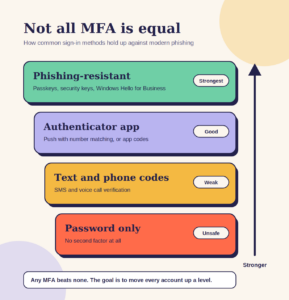
MFA works. That is exactly why attackers go around it.
Microsoft is blunt about this. In its analysis of a large phishing campaign, it noted that the attack was not a vulnerability in MFA at all. Instead, attackers had built a way to let the victim complete MFA themselves, then walk off with the result.
That distinction matters. MFA is not broken. The problem is that the most common forms of MFA, such as a code by text message or a tap on a phone, prove that the right person approved a sign-in. They do not prove the person was signing in to the real Microsoft website.
How attackers get past a second factor
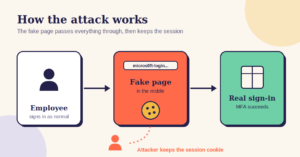
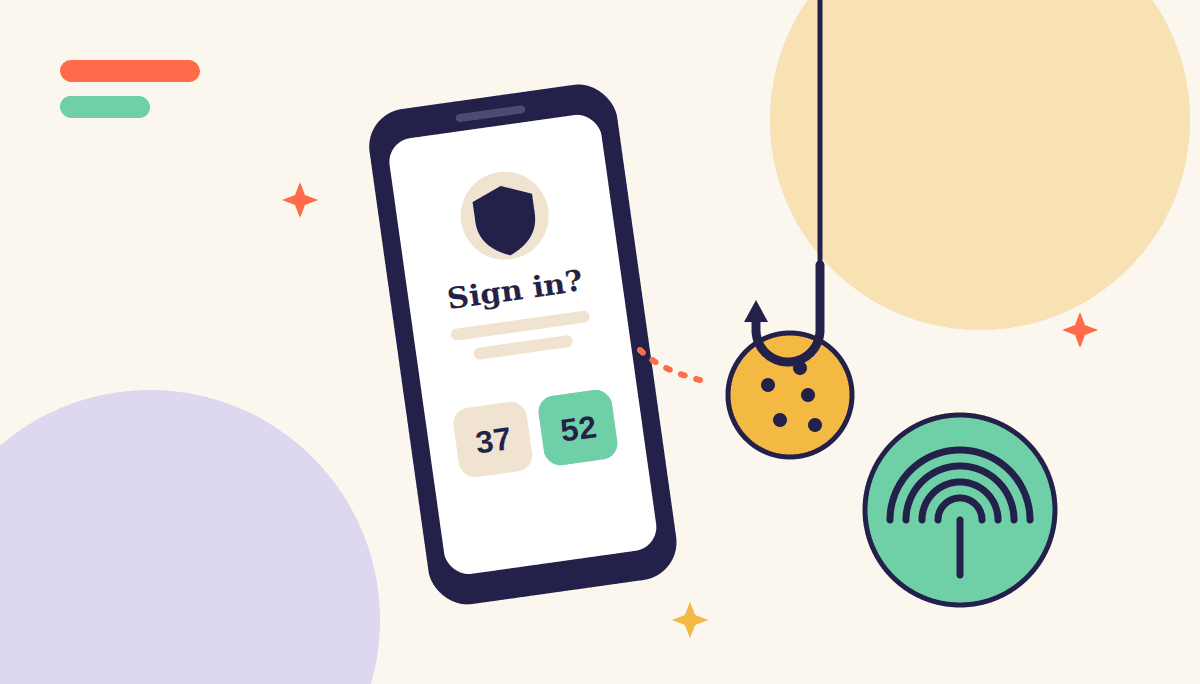
The most effective technique is called adversary-in-the-middle phishing. The victim receives a convincing email and clicks a link to what looks like a Microsoft sign-in page. Behind the scenes, the fake page passes everything through to the real one: the password, the MFA prompt, the approval. The victim signs in normally and sees nothing unusual.
What the attacker captures is the session cookie, the small token that keeps you signed in after MFA succeeds. With it, they can open the mailbox as if they were the user, without needing the password or the phone again. In the campaign Microsoft analysed, attackers used the stolen sessions to read finance-related emails and launch payment fraud against other organizations.
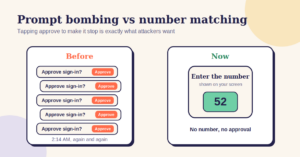
The second technique is MFA fatigue. An attacker who already has a password triggers sign-in prompts over and over, often late at night, until the user taps approve just to make it stop. Microsoft responded by enforcing number matching for Authenticator push notifications from May 2023, so users must type a number shown on the sign-in screen rather than simply tapping approve.
The quiet step attackers take next
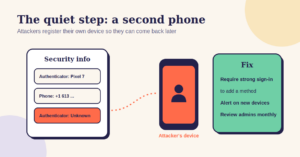
Once inside, a careful attacker tries to stay there. One common move is to register their own phone or authenticator app on the victim’s account, so they can sign in again later even after the stolen session expires.
In a later investigation, Microsoft described attackers who, after replaying a stolen session cookie, took advantage of MFA policies that weren’t configured to best practice to add new MFA methods without being challenged. From there, they moved on to targeting the victim’s partners and suppliers.
The lesson for a small business is simple: protect the process of registering MFA methods as carefully as the sign-in itself. If anyone with a valid session can add a new phone, the second factor is only as strong as the weakest session.
Phishing-resistant sign-in closes the gap
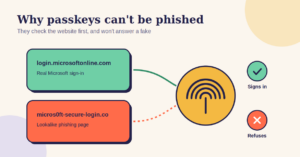
The real fix is a category of sign-in methods called phishing-resistant MFA. These methods check which website is asking before they respond, so a fake page cannot use them even if the user is completely fooled. Passkeys, physical security keys and Windows Hello for Business all work this way.
In Microsoft 365, you require these methods using Conditional Access authentication strengths, which let you specify exactly which sign-in methods are acceptable for which users. That needs Microsoft Entra ID P1, which is included in Microsoft 365 Business Premium.
You do not need to move everyone at once. Start with the accounts that would do the most damage in the wrong hands: administrators, the owner, and anyone who approves payments. Those are exactly the accounts attackers look for first.
What the federal baseline says
The Canadian Centre for Cyber Security’s baseline controls for small and medium organizations list strong user authentication as one of thirteen essential controls. It is a sensible place to anchor your approach when a client or insurer asks how you protect sign-ins.
Insurers in particular have moved beyond asking whether you have MFA. Many now ask how it is enforced, whether it covers every user including administrators, and whether it applies to remote access. A clear answer that includes phishing-resistant methods for your most sensitive accounts is a considerably stronger position than “everyone has the app.”
Thirty days to stronger sign-ins
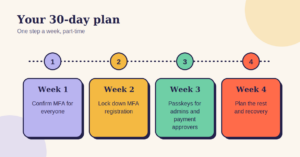
Week one.
Confirm the basics. Make sure MFA is required for every user, not just administrators, and that text message and phone call codes are not the only option. Check that nobody can approve a sign-in with a simple tap; number matching should be in effect for everyone using Authenticator.
Week two.
Protect MFA registration. Require that adding or changing a sign-in method needs a fresh, strong authentication, and set up alerts when someone registers a new method. Review the methods currently registered for your administrators and remove anything you do not recognize.
Week three.
Move your highest-risk accounts to phishing-resistant sign-in. Enrol administrators, the owner and anyone who approves payments in passkeys, security keys or Windows Hello for Business. Then create a Conditional Access policy requiring phishing-resistant MFA for those accounts.
Week four.
Plan the rest. Decide which other roles should move next, test the experience with a few willing staff, and write down how someone recovers access if they lose their phone or key. A good recovery process matters as much as the method itself.
That is a month of part-time effort, and it moves your business from MFA that stops yesterday’s attacks to sign-ins that hold up against today’s.
If you would rather not do it alone, we help Ottawa businesses review their sign-in settings, roll out phishing-resistant MFA for their most sensitive accounts, and keep it simple enough that staff actually use it.
Book a conversation
Technety is an Ottawa IT consultancy working with small and mid-sized organizations on Microsoft 365, security and day-to-day IT support. This article is general information, not legal advice.
Sources
Microsoft Security Blog: From cookie theft to BEC, attackers use AiTM phishing sites as entry point to further financial fraud · Microsoft Security Blog: Detecting and mitigating a multi-stage AiTM phishing and BEC campaign · Microsoft Learn: Number matching in MFA push notifications · Microsoft Learn: Conditional Access authentication strengths · Canadian Centre for Cyber Security: Baseline cyber security controls
Similar
Our newsroom highlights the milestones shaping Shipora and the markets we serve.