How Do You Know If Your Microsoft 365 Account Has Been Hacked?
The warning signs to look for, and exactly what to do in the first hour
Quick answer
The most reliable signs that a Microsoft 365 account has been hacked are inbox rules you didn’t create, new forwarding to an outside email address, and contacts receiving emails from you that aren’t in your Sent Items. Other signs include missing emails, a changed email signature, an unfamiliar MFA method and sign-ins from unusual places. If you see any of them, act within the hour: block sign-in and reset the password, revoke all sessions, remove the attacker’s rules and forwarding, check MFA methods and admin roles, and warn the people you deal with.
Key takeaways
- Attackers usually hide inside a mailbox quietly instead of locking you out, so a hacked account often looks normal.
- Hidden inbox rules and external forwarding are the most common and most telling signs.
- Resetting the password alone may not remove an attacker straight away; you also need to revoke sessions.
- The first hour matters most, especially if payments or banking details are involved.
When people imagine a hacked email account, they picture being locked out. In reality, most attackers do the opposite. They sign in quietly, set up a few hidden rules, and watch the mailbox for days or weeks, waiting for the right moment to send a fake invoice or redirect a payment. This guide explains how to spot a compromised Microsoft 365 account, what to do in the first hour, and how to stop it happening again. It’s written for organizations of twenty to fifty people in Ottawa, but it applies to any business using Microsoft 365.
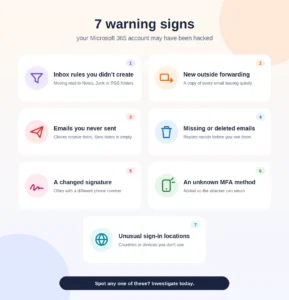
What are the signs a Microsoft 365 account has been hacked?
Microsoft lists the main symptoms in its guide to responding to a compromised email account. The most important are:
- Inbox rules you didn’t create, especially rules that forward email to unknown addresses or move messages to the Notes, Junk Email or RSS Subscriptions folders.
- Recently added external forwarding, sending a copy of every email to an outside address.
- Contacts receiving email from you that isn’t in your Sent Items.
- Missing or deleted emails, often replies the attacker doesn’t want you to see.
- An unusual email signature, sometimes with a changed phone number so callers reach the attacker.
From our own work, two more signs are worth adding: a new MFA method you don’t recognize, which attackers add so they can get back in later, and sign-ins from countries or devices you don’t use. Microsoft’s troubleshooting guide for compromised accounts is clear that any of these symptoms is a reason to investigate.
What does a hidden inbox rule look like?
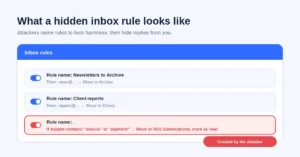
A malicious inbox rule usually looks harmless at a glance. Attackers give rules short or meaningless names, such as a single full stop, and set them to act on emails about money. Microsoft describes rules that look for keywords like “invoice” and move matching emails elsewhere, so the real user never sees the replies.
The result is that a supplier asking “did you really change your bank details?” never reaches you. To check, open Outlook on the web, go to Settings and search for “rules”, then look for any rule you don’t recognize, especially ones that move, delete or forward email.
Why would clients receive emails I never sent?
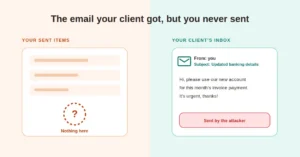
Because the attacker is sending them from your account. Microsoft lists users receiving email from the compromised account without the corresponding email in the Sent Items folder as a key symptom; attackers delete their sent messages to cover their tracks.
These emails are often the most damaging part of the attack. They come from your real address, follow your real conversations, and typically ask for something urgent, such as paying an invoice to “new” banking details. If a client mentions an email from you that you don’t remember sending, treat it as a warning sign immediately.
What should you do in the first hour?
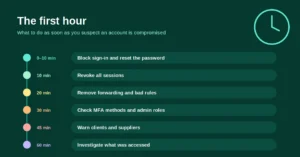
Move quickly and in this order, so the attacker is locked out before you start cleaning up.
1. Block sign-in and reset the password
In the Microsoft 365 admin center, block the user from signing in and reset their password. Don’t send the new password by email, since the attacker may still be reading it.
2. Revoke all sessions
This step is often missed. A password reset doesn’t always end an attacker’s existing session straight away. Microsoft explains that access tokens last an hour by default and that refresh tokens must be revoked to force everyone to sign in again. Use “Revoke sessions” on the user in the Microsoft Entra admin center.
3. Remove forwarding and bad rules
Remove any email forwarding to outside addresses and delete inbox rules the user didn’t create. Microsoft’s response guide walks through both steps.
4. Check MFA methods and admin roles
Remove any MFA method the user doesn’t recognize, and if the account has admin rights, remove them until the investigation is finished. Then require MFA before the user signs in again; the US Cybersecurity and Infrastructure Security Agency recommends implementing multi-factor authentication as part of remediation.
5. Warn clients and suppliers
Tell the people you deal with that your account was compromised and that they should ignore any recent requests to change payment details. If a payment has already been made, call your bank right away.
6. Investigate what was accessed
Work out how long the attacker had access, which emails and files they could see, and whether other accounts were targeted. This tells you whether any personal information was exposed.
Think an account may be compromised? Call us and we’ll help you lock it down, clean it up and work out what was accessed. Get help now.
Is a hacked email account a privacy breach in Canada?
It can be. Under federal privacy law, a breach of security safeguards includes unauthorized access to personal information, and a mailbox full of client emails often contains exactly that. The Office of the Privacy Commissioner’s guidance on mandatory breach reporting explains when you must report a breach and notify the people affected, and it requires you to keep a record of every breach for two years, whether or not it’s reported.
What does a compromised account look like in practice?
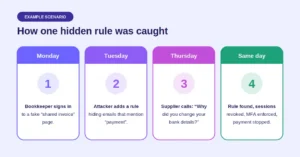
Example scenario: a bookkeeper at a small Ottawa firm receives an email on Monday about a “shared invoice” and signs in on what looks like a Microsoft page. It’s fake, and the attacker now has her password.
- Tuesday: the attacker signs in and creates an inbox rule named “.” that moves any email containing “payment” into the RSS Subscriptions folder and marks it as read.
- Wednesday: the attacker emails a supplier from her account, asking for the next payment to go to “updated” banking details, then deletes the sent message.
- Thursday: the supplier phones to double-check the change. The firm realizes something is wrong, finds the hidden rule, revokes the account’s sessions, enforces MFA and contacts the bank before the money leaves.
The firm was lucky: one phone call stopped the fraud. Without it, the hidden rule would have kept every warning out of sight. (This is an illustrative scenario based on a common attack pattern, not a specific client.)
How do you stop it happening again?
The best protection is making stolen passwords useless. Require MFA for every account, and for the people who handle money, consider phishing-resistant methods; our guide to why basic MFA isn’t enough anymore explains the difference. Block automatic forwarding to outside addresses, turn on alerts for suspicious inbox rules, and keep an eye on your Microsoft Secure Score so security gaps are caught early. Finally, agree a simple rule with your team: any change to banking details is confirmed by phone, on a number you already have.
Conclusion
A hacked Microsoft 365 account rarely announces itself. The signs are quiet: a rule you didn’t create, a forwarding address you don’t recognize, an email in a client’s inbox that isn’t in your Sent Items. Knowing what to look for, and acting within the first hour, is the difference between a quick clean-up and a costly fraud. Put MFA, forwarding controls and a phone-verification rule in place, and most of these attacks will fail before they start.
Common questions about hacked Microsoft 365 accounts
1. How can I tell if my Microsoft 365 email has been hacked?
Look for inbox rules you didn’t create, forwarding to an outside address, emails missing from your Sent Items that contacts received, missing emails, a changed signature and sign-ins from unusual places.
2. Will I be locked out if my account is hacked?
Usually not. Most attackers stay hidden and keep the account working normally, so they can watch your email and send fraudulent messages without being noticed.
3. Is changing my password enough?
No. Also revoke all sessions so the attacker is signed out everywhere, remove any forwarding and suspicious rules, and check for MFA methods you don’t recognize.
4. Where do I check my inbox rules?
In Outlook on the web, open Settings and search for “rules”. Delete any rule you didn’t create, especially ones that move, delete or forward email.
5. How do I check whether my email is being forwarded?
An administrator can check the user’s mail settings in the Microsoft 365 admin center under email forwarding. Remove any forwarding to an address you don’t recognize.
6. Why would an attacker add a new MFA method?
So they can sign back in later, even after the password is changed. Remove any authentication method the user doesn’t recognize.
7. What should I tell my clients?
Let them know your account was compromised, and ask them to ignore any recent requests to change payment details or send money until they’ve confirmed with you by phone.
8. Do I have to report a hacked email account?
If personal information may have been accessed and there’s a real risk of significant harm, Canadian privacy law can require you to report it and notify the people affected. Either way, keep a record of the breach.
9. How do hackers usually get into Microsoft 365 accounts?
Most often through phishing emails that lead to fake sign-in pages, reused passwords from other breaches, or accounts without multi-factor authentication.
10. How can I prevent my Microsoft 365 account from being hacked?
Require MFA for every user, block external forwarding, alert on suspicious inbox rules, train staff to spot phishing and confirm any banking changes by phone.
This article is general information, not legal advice.
Sources
Microsoft Learn: Responding to a compromised email account · Microsoft Learn: Determine whether an account is compromised · Microsoft Learn: Alert classification for suspicious email forwarding activity · Microsoft Learn: Revoke user access in Microsoft Entra ID · CISA: Identify and remove suspicious email forwarding rules · OPC: What you need to know about mandatory reporting of breaches of security safeguards
Similar
Our newsroom highlights the milestones shaping Shipora and the markets we serve.