What Is a Good Microsoft Secure Score?
A practical guide for small businesses: what your score means, why it moves and how to raise it
Quick answer
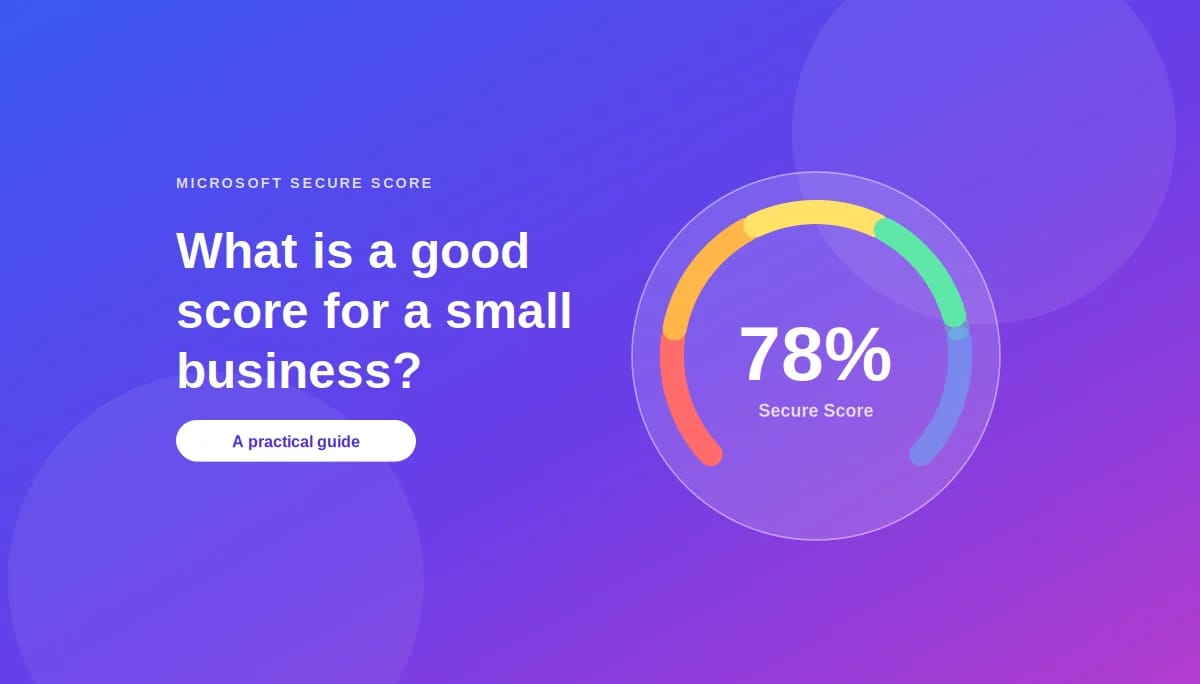
There is no official “good” Microsoft Secure Score. Microsoft lets each organization set its own target and compares your score with similar-sized organizations. As a working guide, most small businesses should aim for 60 to 79%, the range where the high-impact protections like multi-factor authentication, protected admin accounts and email security are in place. Below 40% usually means the basics are missing. Because your maximum score depends on your Microsoft 365 licence, the trend over time matters more than the number itself.
Key takeaways
- Secure Score measures how many of Microsoft’s recommended security actions you’ve completed, as a percentage of the points available.
- There is no official good score; Microsoft lets you set your own good, okay and bad ranges.
- Your licence decides how many points you can earn, so compare your score with your own past, not with other companies.
- Scores can drop without warning when settings, users or devices change.
Microsoft Secure Score is one of the most useful free tools in Microsoft 365, and one of the most misunderstood. Business owners see a percentage and naturally want to know whether it’s good or bad. This guide answers that in plain language, explains what the number really measures, walks through an example, and sets out a month of work to raise it. It’s written for organizations of twenty to fifty people in Ottawa, but it applies to any business using Microsoft 365.
What is Microsoft Secure Score?
Microsoft Secure Score is a percentage that shows how many of Microsoft’s recommended security actions your organization has completed. Microsoft describes it as a measurement of an organization’s security posture, with a higher number indicating more recommended actions taken.
You’ll find it in the Microsoft Defender portal at security.microsoft.com/securescore. It covers identity, email, devices, apps and data, and lists each recommendation along with how many points it’s worth. It’s included with your Microsoft 365 subscription, so there’s nothing extra to buy.
What is a good Secure Score for a small business?
Microsoft doesn’t publish an official “good” score. Instead, it lets you set your own target, with a Secure Score zone customized to your organization’s definitions of good, okay and bad ranges, and shows how you compare with organizations of a similar size.
For small businesses, we use this working guide:
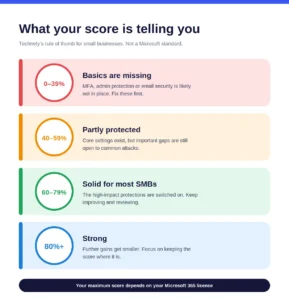
- 0 to 39%: basics are missing. Multi-factor authentication, admin protection or email security is likely not in place.
- 40 to 59%: partly protected. Core settings exist, but important gaps remain.
- 60 to 79%: solid for most small businesses. The high-impact protections are on.
- 80% and above: strong. Further gains get smaller; the focus becomes keeping the score there.
This is Technety’s rule of thumb, not a Microsoft standard. A score in the 60s with every account protected by MFA is safer than a score in the 80s earned mostly from low-impact settings, so what’s behind the number matters more than the number itself.
Not sure where you stand? We’ll review your Microsoft Secure Score with you and show you the three changes that would make the biggest difference. No obligation. Book a free consultation.
How is Microsoft Secure Score calculated?
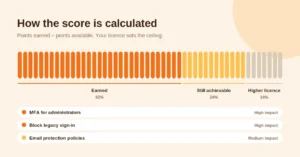
Your score is the points you’ve earned, divided by the points available to you. Each recommended action is worth a set number of points, and you earn them by completing the action, sometimes partially if it only covers some of your users.
The points available depend on your licence. Microsoft shows an achievable score, the score you can reach with your Microsoft licences and current risk acceptance. A business on a higher plan, such as Microsoft 365 Business Premium, has more recommendations available, which is why comparing scores between companies on different plans can be misleading.
Not every recommendation has to be completed in Microsoft’s way. If another tool already covers it, you can mark it as resolved through a third party, and if an action isn’t right for your business, you can mark the risk as accepted. Microsoft notes that the score can also reflect when non-Microsoft solutions addressed recommended actions.
Why does a Secure Score go down?

Secure Scores drop when settings, users or devices change, often without anyone noticing. Microsoft’s history view includes a regression trend showing points lost because of configuration, user or device changes.
A new administrator added without MFA, a policy relaxed during a quick fix, or new laptops that haven’t received their security settings can all cost points. Microsoft also adds and updates recommended actions over time, so the points available can change. A falling score is an early warning worth investigating, not just a number to watch.
How do you improve your Secure Score?
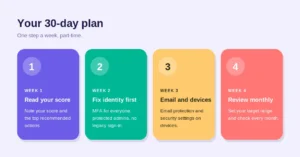
Start with the recommendations that give the most protection for the least effort. Microsoft ranks them this way: the highest-ranked recommended actions have a large number of points remaining with low difficulty, user impact and complexity.
Week one: read your score
Open Secure Score in the Defender portal, note your current percentage and your achievable score, and list the top ten recommended actions. Check which are already covered by other tools, and mark them accordingly.
Week two: fix identity first
Require MFA for everyone, protect administrator accounts and block legacy sign-in methods. These are among the highest-impact actions in Secure Score and the most common way attackers get in. Our guide to why basic MFA isn’t enough anymore explains how to go a step further with phishing-resistant sign-in.
Week three: email and devices
Turn on email protection policies against phishing and malicious attachments, and apply security settings to laptops and phones. This is usually where the next big gains come from.
Week four: set a target and review monthly
Set your own good, okay and bad ranges in Secure Score, and review the score every month. Look at what changed whenever it drops, and decide deliberately which remaining actions to complete and which to accept.
What does a Secure Score improvement look like in practice?
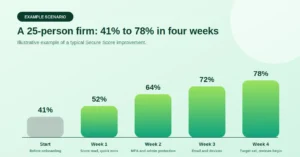
Example scenario: a 25-person professional services firm in Ottawa starts at 41%. Every staff member has a password, but MFA is only on for the owner, two former employees still have active accounts, and email protection is at its default settings.
- Week one (52%): the score is reviewed, the two old accounts are removed, and a handful of quick, low-effort recommendations are completed.
- Week two (64%): MFA is required for everyone, admin accounts are separated and protected, and legacy sign-in is blocked. This single week brings the biggest jump.
- Week three (72%): email protection policies are switched on and security settings are applied to company laptops.
- Week four (78%): the firm sets its target range at 70 to 85%, marks two recommendations as covered by its existing backup tool, and schedules a monthly review.
The firm ends the month in the “solid” range, with the protections that stop the most common attacks in place. Just as importantly, it now has a monthly habit that catches drops before they become problems.
Secure Score also doesn’t cover everything. It won’t show you files that are shared too widely, for example; our guide to oversharing in SharePoint and OneDrive covers that side of Microsoft 365 security.
Conclusion
There’s no magic number for Microsoft Secure Score, but there is a clear path. For most small businesses, 60 to 79% with every account protected by MFA is a solid, realistic target. Focus on the high-impact identity and email actions first, remember that your licence sets your ceiling, and review the score every month so drops are caught early. Treated this way, Secure Score stops being a confusing percentage and becomes a simple, ongoing measure of how well your business is protected.
Common questions about Microsoft Secure Score
1. Is there an official “good” Microsoft Secure Score?
No. Microsoft doesn’t set a pass mark. It compares your score with similar-sized organizations and lets you define your own good, okay and bad ranges. As a rule of thumb, 60 to 79% is solid for most small businesses.
2. Where do I find my Microsoft Secure Score?
In the Microsoft Defender portal at security.microsoft.com/securescore. You’ll need an admin role with security permissions, such as Security Administrator, to view it.
3. Is Microsoft Secure Score free?
Yes. It’s included with Microsoft 365 at no extra cost.
4. Why did my Secure Score drop when I didn’t change anything?
Something usually did change, such as a new user, a new device or an adjusted policy, or Microsoft updated its recommended actions. The history and regression trend in the Secure Score dashboard shows what caused it.
5. Does upgrading my Microsoft 365 licence raise my Secure Score?
Not by itself. A higher plan, such as Business Premium, adds more recommended actions, so your achievable score goes up, but you only earn the points by completing the actions.
6. Should we aim for 100%?
Usually not. Some recommendations won’t suit every business, and you can accept the risk for those deliberately. A steady score in the right range, with the high-impact actions done, matters more than a perfect number.
7. Can other security tools count towards my Secure Score?
Yes. If a third-party tool already handles a recommendation, you can mark it as resolved through a third party so it’s reflected in your score.
8. What are the quickest ways to improve a Secure Score?
Require MFA for every user, protect administrator accounts, block legacy sign-in and turn on email protection policies. These are high-impact and usually low-effort.
9. How often should we check our Secure Score?
Monthly is enough for most small businesses, plus a quick check after big changes such as new staff, new devices or new software.
10. How long does it take to improve a Secure Score?
Most small businesses can make significant gains within a month by completing the high-impact identity and email actions first. Keeping the score high takes a short monthly review.
This article is general information, not legal advice.
Sources
Microsoft Learn: Microsoft Secure Score · Microsoft Learn: Microsoft Secure Score recommended actions · Microsoft Learn: Track your Microsoft Secure Score history and meet goals · Microsoft Learn: Improve your Secure Score · Canadian Centre for Cyber Security: Baseline cyber security controls
Similar
Our newsroom highlights the milestones shaping Shipora and the markets we serve.