What Is DMARC, and Does Your Small Business Need It?
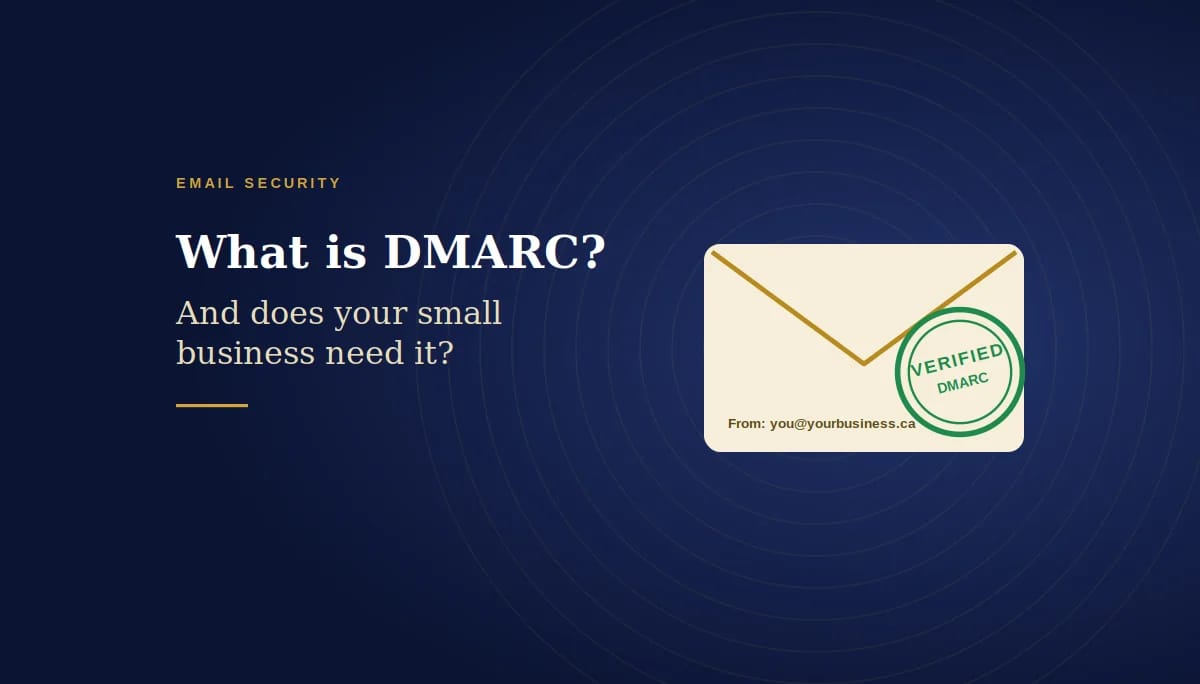
How DMARC stops criminals from sending email in your name, explained in plain English
Quick answer
DMARC is an email security setting that stops criminals from sending emails that pretend to come from your domain. It works with two other settings, SPF and DKIM, to prove your real emails are genuine, and it tells other mail servers what to do with fakes: deliver them, send them to junk, or block them. Yes, most small businesses need it. Without DMARC, anyone can send an invoice that appears to come from your exact email address. It’s free to set up in Microsoft 365, but it should be rolled out gradually over a few weeks so your own legitimate email isn’t blocked.
Key takeaways
- DMARC protects your domain from being spoofed in fake invoices, payment requests and phishing emails.
- It relies on SPF (which servers may send for you) and DKIM (a digital signature on each email).
- There are three policies, none, quarantine and reject, and you should move through them in order.
- Microsoft now requires DMARC from organizations that send more than 5,000 emails a day to Outlook.com addresses.
Most business owners have never heard of DMARC, yet it may be protecting, or failing to protect, every email their business sends. Email was never designed to check who a message is really from. Without extra protection, a criminal can send an email that shows your exact address in the “From” line and is almost impossible for your clients to spot. This guide explains what DMARC is, how it works with SPF and DKIM, and how to set it up safely. It’s written for organizations of twenty to fifty people in Ottawa, but it applies to any business using Microsoft 365.
What is DMARC?
DMARC stands for Domain-based Message Authentication, Reporting and Conformance. Microsoft describes it as a method of email authentication that helps validate mail sent from your organization to prevent spoofed senders used in business email compromise, ransomware and other phishing attacks.
In plain terms, DMARC does two jobs. It checks that an email claiming to come from your domain really does, and it tells the receiving mail server what to do if it doesn’t. It also sends you reports, so you can see who is sending email using your domain name, including people who shouldn’t be.
What’s the difference between SPF, DKIM and DMARC?
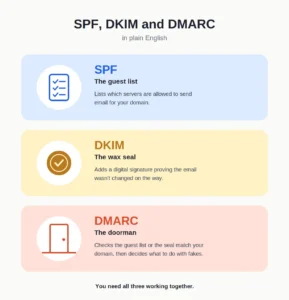
They are three separate settings that work as a team:
- SPF is the guest list. It lists the servers that are allowed to send email for your domain, such as Microsoft 365 or your newsletter tool.
- DKIM is the wax seal. It adds a digital signature to each email, proving it came from you and wasn’t changed on the way.
- DMARC is the doorman. It checks that the guest list or the seal matches the domain in the “From” address, then applies your instructions for anything that fails.
The Canadian Centre for Cyber Security describes these as three security protocols that act jointly to protect email domains from being spoofed. SPF and DKIM on their own aren’t enough, because they don’t check the address your clients actually see. DMARC closes that gap.
How does a DMARC check work?
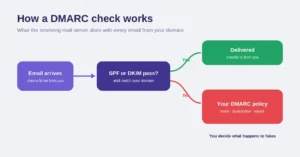
When your client’s mail server receives an email that says it’s from your domain, it runs a quick check. According to the Cyber Centre, an email passes DMARC if it passes either SPF or DKIM, and the domain used in that check matches the one in the “From” field. If it fails, the receiving server applies the policy specified in the sending domain’s DMARC record.
That last part is the important one: you decide what happens to fakes. Without a DMARC record, the receiving server has no instructions from you, and a convincing fake may land straight in your client’s inbox.
What are the three DMARC policies?
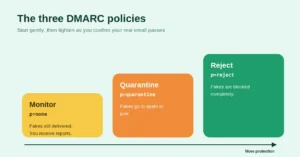
Microsoft lists three options for messages that fail DMARC: reject, quarantine or no instruction:
- p=none (monitor): fakes are still delivered, but you receive reports about who is sending email as your domain.
- p=quarantine: emails that fail are sent to spam or junk.
- p=reject: emails that fail are blocked completely.
The goal is reject, because that’s the only policy that actually stops fakes from reaching anyone. But you get there in steps, because jumping straight to reject can block your own legitimate email if a service you use, such as an invoicing app, isn’t set up correctly yet.
Not sure whether your domain is protected? We’ll check your SPF, DKIM and DMARC records and tell you exactly where you stand. No obligation. Book a free consultation.
Does Microsoft 365 set up DMARC for you?
Not completely. Microsoft notes that for the default “onmicrosoft.com” domain, SPF and DKIM are already configured, but you still need to create the DMARC record yourself. For your own business domain, such as yourbusiness.ca, you need to set up all three: SPF, DKIM and DMARC, in your domain’s DNS settings.
It’s also worth checking domains you own but don’t use for email. The Cyber Centre’s guidance covers these too: publishing records that say no email should ever come from them stops criminals from using your spare domains instead.
Is DMARC required?
For some senders, yes. Microsoft announced that for domains sending more than 5,000 emails a day to Outlook.com, Hotmail and Live addresses, SPF, DKIM and DMARC are required, with a DMARC policy of at least p=none. Since May 5, 2025, messages from non-compliant high-volume domains are routed to the Junk folder.
Most small businesses send far fewer emails than that, so the requirement doesn’t apply directly. But the protection still matters: the fake invoice that hurts your business only needs to be sent once.
How do you set up DMARC safely?
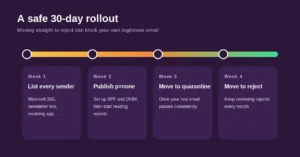
Microsoft recommends a gradual approach, and so do we. Here’s a simple 30-day plan.
Week one: list everything that sends email for you
Make a list of every service that sends email using your domain: Microsoft 365, your newsletter platform, your invoicing or accounting software, your website’s contact form and your CRM. Each one needs to be included in SPF or set up with DKIM, or its emails will fail.
Week two: set up SPF and DKIM, then publish p=none
Make sure SPF and DKIM are working for Microsoft 365 and each service on your list, then publish a DMARC record with p=none and an address to receive reports. Your email won’t be affected, and you’ll start seeing who sends as your domain.
Week three: move to quarantine
Once the reports show your legitimate email passing consistently, change the policy to p=quarantine. Anything that still fails will go to junk rather than being blocked outright, which gives you a safety net while you watch for problems.
Week four: move to reject
When you’re confident everything legitimate passes, change the policy to p=reject. Fakes are now blocked completely. Keep an eye on the reports every month, especially when you start using a new service that sends email for you.
What does DMARC look like in practice?
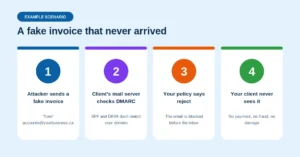
Example scenario: a small Ottawa accounting firm moves its DMARC policy to reject. A few weeks later, a criminal sends one of the firm’s clients a convincing invoice, apparently from accounts@ the firm’s own domain, asking for payment to a new bank account.
- The client’s mail server checks DMARC. The email didn’t come from the firm’s approved servers and has no valid DKIM signature.
- The firm’s policy says reject, so the email is blocked before it reaches the client’s inbox.
- The client never sees it. There’s no confusion, no phone call and no lost payment.
Without DMARC, that email would likely have been delivered, carrying the firm’s real address. (This is an illustrative scenario based on a common attack pattern, not a specific client.)
What DMARC doesn’t protect against
DMARC is powerful, but it has limits. It only protects your exact domain. It won’t stop an attacker who registers a lookalike domain, such as one with a single letter changed, and it won’t help if a real mailbox in your business is hacked, because those emails genuinely come from your domain. That’s why DMARC works best alongside multi-factor authentication, staff awareness and a simple rule that any change to banking details is confirmed by phone. Our guide on how to know if your Microsoft 365 account has been hacked covers that side of email security.
Conclusion
DMARC is one of the simplest, lowest-cost ways to protect your business’s reputation. It stops criminals from sending emails in your name, gives you visibility into who is using your domain, and helps your real emails reach their destination. Set up SPF and DKIM first, publish DMARC in monitoring mode, then move step by step to reject. A few weeks of careful work protects every email your business sends from that point on.
Common questions about DMARC
1. What is DMARC in simple terms?
DMARC is an email setting that checks whether emails claiming to be from your domain really are, and tells other mail servers what to do with the fakes: deliver them, send them to junk or block them.
2. Does my small business need DMARC?
In most cases, yes. Without it, criminals can send emails that show your exact address, which makes fake invoices and payment requests much more convincing.
3. What is the difference between SPF, DKIM and DMARC?
SPF lists the servers allowed to send your email, DKIM adds a digital signature to each message, and DMARC checks that they match your domain and applies your policy to anything that fails.
4. Does Microsoft 365 set up DMARC automatically?
No. Even for the default onmicrosoft.com domain, you need to create the DMARC record yourself, and for your own business domain you need to set up SPF, DKIM and DMARC.
5. Which DMARC policy should we use?
Start with p=none to monitor, move to p=quarantine once your real email passes, and finish at p=reject, which is the only policy that blocks fakes completely.
6. Can DMARC block my own emails?
Yes, if a service that sends email for you isn’t set up with SPF or DKIM. That’s why you should list every sender first and move to reject gradually.
7. Does DMARC stop all phishing emails?
No. It stops criminals from using your exact domain, but not lookalike domains or emails sent from a genuinely hacked mailbox.
8. Is DMARC required by law in Canada?
There’s no general legal requirement for small businesses, but the Canadian Centre for Cyber Security recommends it, and Microsoft requires it for high-volume senders to Outlook.com.
9. What are DMARC reports?
They’re summaries sent by other mail servers to an address you choose, showing which servers are sending email using your domain and whether those emails passed or failed.
10. What about domains we own but don’t use for email?
Publish records stating that no email should come from them, so criminals can’t use your spare domains to send fake messages.
This article is general information, not legal advice.
Sources
Microsoft Learn: Set up DMARC to validate the From address domain for senders in Microsoft 365 · Canadian Centre for Cyber Security: Implementation guidance: email domain protection (ITSP.40.065) · Microsoft Tech Community: Outlook’s new requirements for high-volume senders
Similar
Our newsroom highlights the milestones shaping Shipora and the markets we serve.